
What is HTML? How It Works (Beginner to Advanced)

Introduction
When you visit any website—from a simple blog to complex platforms like Google—everything you see starts with one fundamental technology: HTML.
But what exactly is HTML? And more importantly, how does it actually work behind the scenes?
This guide goes beyond basic definitions. Instead of just telling you what HTML is, we’ll explore how it powers the web, how browsers interpret it, and why it still matters today—even in modern frameworks like React and Next.js.
What is HTML (Beyond the Definition)
The official definition vs practical understanding
HTML stands for HyperText Markup Language.
Most beginner tutorials stop here—but this definition doesn’t tell you how HTML actually functions in real-world development.
A more practical way to understand HTML is:
HTML defines the structure and meaning of content on a webpage.
HTML is not a programming language
One of the most common misconceptions is thinking HTML is “coding logic.”
It’s not.
- No variables
- No loops
- No conditions
Instead, HTML is a declarative language. It answers:
What is this content?
Examples:
<h1>→ This is a heading<p>→ This is a paragraph<img>→ This is an image
Why HTML is the foundation of every website
Even today, no matter what tools you use:
- React → compiles to HTML
- Next.js → renders HTML (SSR/SSG)
- CMS platforms → output HTML
Browsers only understand HTML at the end of the pipeline.
How HTML Works Behind the Scenes
This is where most articles stop—but this is where real understanding begins.
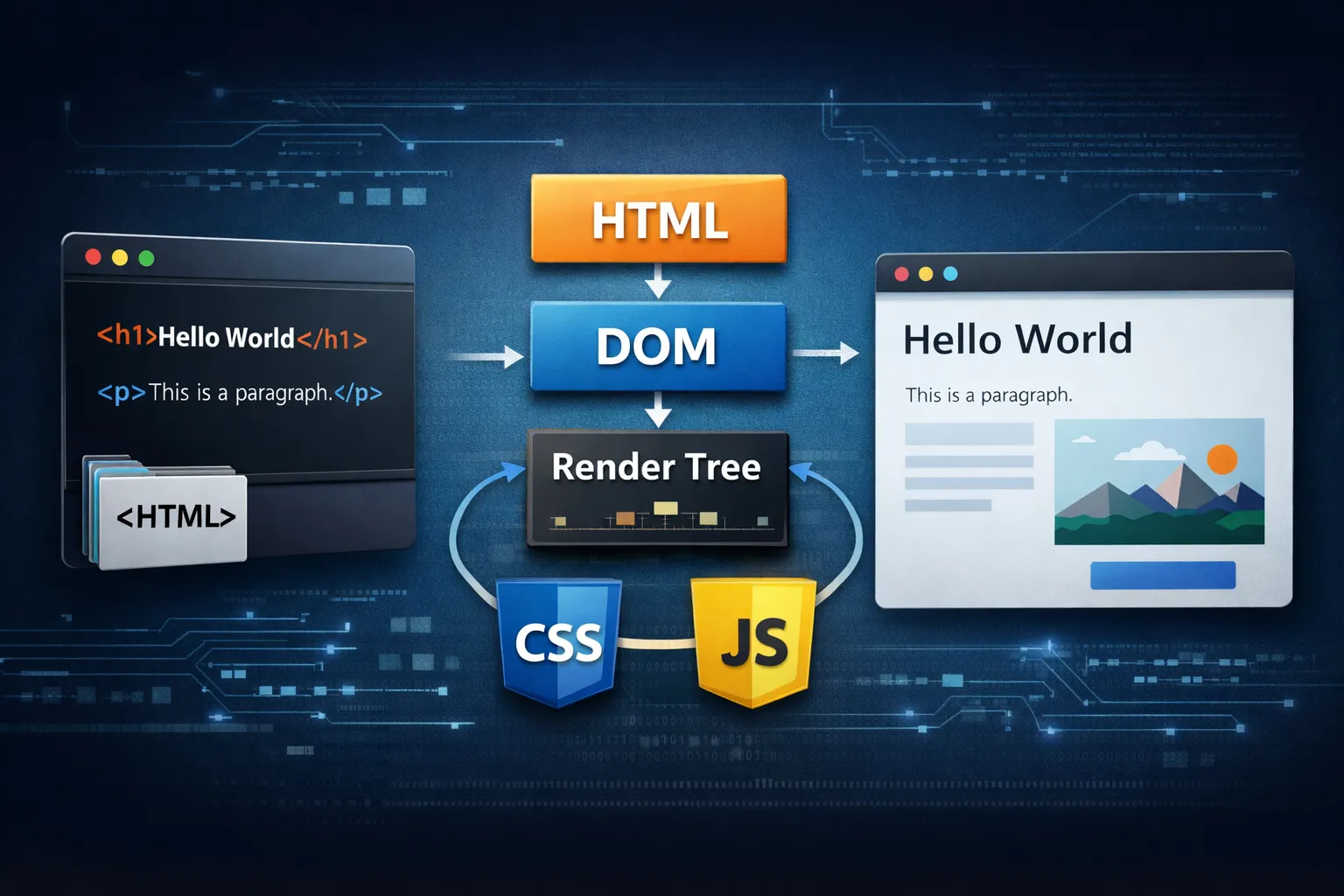
From HTML to DOM (Document Object Model)
When a browser loads a webpage:
- It downloads the HTML file
- It parses the HTML
- It builds a structure called the DOM (Document Object Model)
Think of the DOM as a tree representation of your page.
Example:
<body>
  <h1>Hello</h1>
  <p>World</p>
</body>
Becomes:
body
 ├── h1
 └── p
How browsers render a page
HTML alone doesn’t create the final visual page.
The full process:
- HTML → DOM
- CSS → CSSOM
- DOM + CSSOM → Render Tree
- Render Tree → Painted on screen
Key insight:
HTML is not what you see—it’s what the browser interprets.
Why structure matters more than you think
Bad HTML structure can lead to:
- Broken layouts
- Poor SEO ranking
- Accessibility issues
Good HTML structure improves:
- Page speed
- Search engine understanding
- User experience
Core Components of HTML (Explained Properly)
Elements, tags, and attributes
An HTML element usually consists of:
<a href="https://example.com">Click me</a>
<a>→ taghref→ attributeClick me→ content
Semantic HTML (Critical for SEO & accessibility)
Instead of writing:
<div class="title">My Blog</div>
Use:
<h1>My Blog</h1>
Why?
Because semantic HTML tells browsers and search engines:
- This is a heading
- This is important content
Examples of semantic tags
<header><main><article><section><footer>
Search engines rely on these to understand page structure.
HTML vs CSS vs JavaScript (Clear Comparison)
Understanding this relationship is crucial.
| Technology | Role | Example |
|--||--|
| HTML | Structure | <h1> |
| CSS | Appearance | color: red |
| JavaScript | Behavior | onclick |
How they work together
Imagine a button:
- HTML → creates the button
- CSS → styles it
- JavaScript → makes it clickable
In real-world development, these are tightly integrated.
Common misconception
Many beginners think:
“JavaScript builds the page”
But in reality:
JavaScript modifies HTML (DOM), not replaces it.
Real-World Example: Breaking Down a Web Page
Let’s look at a simplified example:
<header>
  <h1>My Website</h1>
</header>

<main>
  <article>
    <h2>Post Title</h2>
    <p>This is content</p>
  </article>
</main>
What the browser understands
<header>→ site header<main>→ main content<article>→ independent content
What happens if you change it
If you replace everything with <div>:
- SEO weakens
- Accessibility drops
- Structure becomes unclear
Why HTML Still Matters in Modern Development
Some developers think HTML is outdated.
That’s completely wrong.
HTML in modern frameworks
Libraries like React use JSX:
return <h1>Hello</h1>;
But under the hood:
JSX is compiled into an HTML-like structure the browser can understand.
HTML and SEO
Search engines like Google:
- Parse HTML
- Build their own DOM
- Rank based on structure and content
If your HTML is poor, your SEO suffers.
HTML and performance
Core Web Vitals (like LCP, CLS) depend on:
- HTML structure
- Resource loading order
- DOM complexity
HTML in AI-generated websites
Even with AI tools:
- Output = HTML
- Rendering = HTML
- Crawling = HTML
HTML is still the final layer.
Common Beginner Mistakes (And How to Avoid Them)
Using too many <div> elements
This is often called “div soup”.
Fix:
- Use semantic tags instead
Ignoring document structure
Bad:
<h3>Main title</h3>
Good:
<h1>Main title</h1>
Heading hierarchy matters for SEO.
Not understanding rendering flow
Many beginners:
- Change HTML expecting instant visual results
- Ignore CSS and layout rules
Always think:
Structure → Style → Behavior
Missing accessibility basics
Examples:
- No
alton images - No labels for forms
This affects both:
- SEO
- User experience
HTML is Simple, But Not Shallow
HTML is often the first thing developers learn—but also one of the most misunderstood.
It’s not just a markup language. It’s:
- The structural foundation of the web
- The starting point of browser rendering
- The core layer of SEO and accessibility
If you truly understand HTML, you understand how the web works.