EasyPanel VPS Hosting for Your Apps

Deploy applications from Git, run Docker services, and connect databases from one dashboard. Start with a LightNode Ubuntu VPS from $7.71/month or $0.012/hour, install EasyPanel, and keep full root access to your infrastructure.

Start
$7.71/month
EasyPanel VPS
  • 2 GB DDR4 Memory
  • 1 vCPU High Frequency
  • 50 GB NVMe SSD Storage
  • 1 TB Bandwidth
  • Ubuntu VPS for EasyPanel
Agency
$14.7/month
EasyPanel VPS
  • 4 GB DDR4 Memory
  • 2 vCPU High Frequency
  • 50 GB NVMe SSD Storage
  • 2 TB Bandwidth
  • Ubuntu VPS for EasyPanel
Premium
$27.7/month
EasyPanel VPS
  • 8 GB DDR4 Memory
  • 4 vCPU High Frequency
  • 50 GB NVMe SSD Storage
  • 3 TB Bandwidth
  • Ubuntu VPS for EasyPanel
Enterprise
$52.7/month
EasyPanel VPS
  • 16 GB DDR4 Memory
  • 8 vCPU High Frequency
  • 50 GB NVMe SSD Storage
  • 4 TB Bandwidth
  • Ubuntu VPS for EasyPanel

Choose the Right VPS for EasyPanel

Start with the panel requirements, then leave room for your builds, applications, and databases.

Starting VPS price
$7.71/month or $0.012/hour
Installation minimum
Fresh Ubuntu server, at least 2 GB RAM
Suggested small app plan
2 vCPU, 4 GB RAM, 50 GB NVMe
Setup and licensing
Self-install; paid panel licenses are separate

VPS prices use the plans above. EasyPanel features vary by license; paid panel licenses are purchased separately.

Application Hosting Without the Repetitive Setup

EasyPanel brings the everyday deployment workflow into a web interface. LightNode gives you the server, NVMe storage, and root access to build that workflow around your own projects.

From Repository to Running Application

Build from source, use a Dockerfile, or pull a container image. Configure environment variables and review deployment output in the panel.

Applications and Databases Together

Organize related services in projects and connect your application to a database over the internal service network.

Your Server, with Full Root Access

Choose a LightNode location for your audience and retain access to Ubuntu, your Docker workloads, and the underlying server configuration.
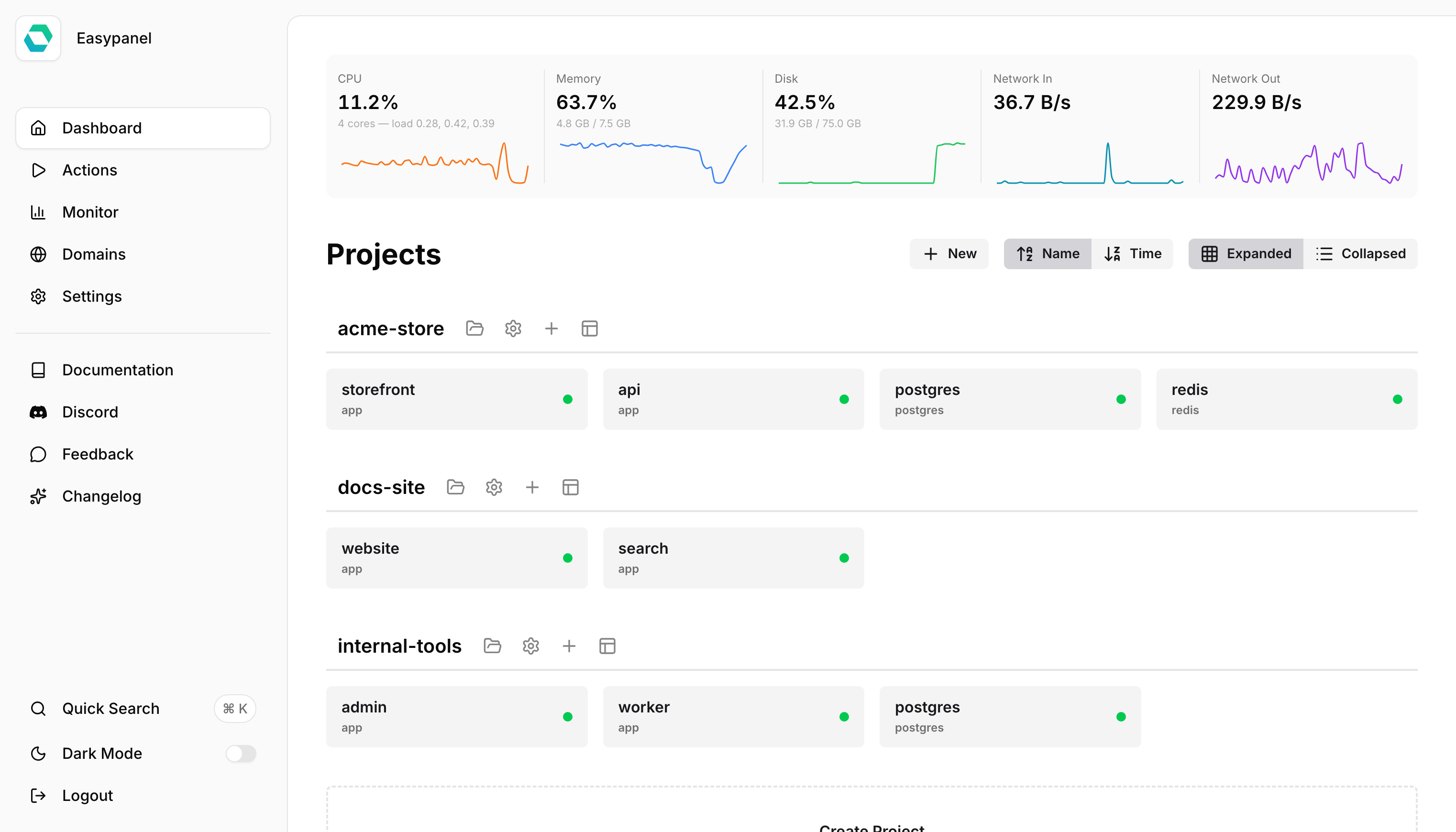
Official EasyPanel dashboard showing projects and server resource monitoring

Connect. Deploy. Grow - Globally

Start deploying your High Performance Cloud VPS worldwide. Reduce latency, with our Cloud VPS located near your users and equipped with local BGP access.

  • USASilicon Valley
  • USAWashington
  • GermanyFrankfurt
  • TurkeyIstanbul
  • Saudi ArabiaRiyadh
  • UAEDubai
  • ThailandBangkok
  • VietnamHanoi
  • CambodiaPhnom Penh
  • VietnamHo Chi Minh
  • ChinaHong Kong
  • ChinaTaipei
  • KoreaSeoul
  • South AfricaJohannesburg
  • SingaporeSingapore
  • PhilippinesManila
  • BangladeshDhaka
  • BrazilSao Paulo
  • Saudi ArabiaJeddah
  • JapanTokyo
  • EgyptCairo
  • BahrainBahrain
  • BulgariaSofia
  • GreeceAthens
  • MalaysiaKuala Lumpur
  • UKLondon
  • OmanMuscat
  • KuwaitKuwait City
  • FranceMarseille
  • PakistanKarachi
  • Nepalkathmandu
  • RussiaMoscow
  • ArgentinaBuenos Aires
  • IndonesiaJakarta
  • MexicoMexico City
  • ChileSantiago
  • MyanmarYangon
  • ColombiaBogota
  • IraqBaghdad
  • QatarDoha
  • PeruLima
LightNode Worldwide Locations
0
21
Years Experience
150+
Data Centers
1,100,000+
Cloud Servers Launched

More resources, less cost

Not only is it cheap, but it can give you up to $15 when you recharge for the first time.

  • LightNode resource
    1 vCPUComputer
    2 GBMemory
    50 GBStorage
    $7.71
  • VU resource
    1 vCPUComputer
    2 GBMemory
    50 GBStorage
    $10.0
  • DO resource
    1 vCPUComputer
    2 GBMemory
    50 GBStorage
    $12.0

The Tools to Deploy and Operate Your Stack

Move from your first deployment to an everyday release workflow with clear control over source code, networking, and persistent data.

GitHub Auto Deploy

Enable automatic deployment for a GitHub source so repository pushes can trigger the next build. Review deployment logs when a release needs attention.

Docker Image Deployments

Run an existing public or private container image and specify the environment, persistent mounts, and application port it needs.

Custom Domains and HTTPS

Route a domain to your application and use automatic SSL certificates after configuring DNS and the required network access.

Database Services

Create PostgreSQL, MySQL, MariaDB, MongoDB, or Redis services alongside your app. Choose resources for the combined workload.

Logs and Resource Visibility

Inspect service output and resource usage from the panel to diagnose failed builds, application errors, and memory pressure.

Persistent Application Data

Configure volume or bind mounts for data that must survive redeployments. Add a backup destination and schedule where supported by your EasyPanel license.

Three Ways to Use an EasyPanel VPS

Practical deployment examples for developers and small teams.

Web Applications and APIs

Connect your application repository, choose a builder, add environment variables, and route a domain to the service. Keep your release workflow close to your code.

Apps with a PostgreSQL Database

Create an application and a Postgres service in the same project. Use the internal database connection and plan memory and backups for both services.

Internal Tools and Staging

Deploy a containerized dashboard or a staging copy of your app with separate credentials and persistent storage. Add authentication before sharing access.

Install EasyPanel on Your Ubuntu VPS

  1. Create a fresh Ubuntu VPS. Choose at least 2 GB RAM. Use a larger plan when you will build applications or host a database on the same server.
  2. Connect as root and install EasyPanel. Follow the official installer on the clean server. Keep ports 80 and 443 available for the panel's web proxy.
  3. Create your administrator account and first project. Open the address returned by the installer, add an application source and any persistent storage, then deploy and connect your domain.

Before going live, check your application's environment variables, persistent storage, and domain settings, then verify that the service is reachable over HTTPS.

Trusted by over 80,000 customers all over the world

Leveraging our two-decade long experience in the IDC industry, our platform, LightNode, which was launched in 2021, has already served more than 80,000 customers across over 130 countries with over 1,100,000 cloud servers launched. Over the next three years, we aim to establish edge compute nodes in more than 100 countries worldwide to cover a broader user base.


IPinfo logo
Turbo VPN logo
Yandex logo
BunnyCDN LOGO
ExitLag LOGO
John Thompson
β€œ I've been using LightNode's VPS for a few months now. It's been a smooth ride so far, no big issues or anything. Their customer service is pretty responsive too.β€œ
John Thompson

EasyPanel VPS β€” Frequently Asked Questions

  • An EasyPanel VPS is a virtual server running the EasyPanel application control panel. It brings application deployments, databases, domains, and container logs into a browser dashboard. LightNode supplies the VPS infrastructure; you install and manage EasyPanel on the server.
  • This page uses the Ubuntu VPS setup path. Create a fresh Ubuntu server, connect as root, and follow the official EasyPanel installer. The installer sets up Docker when needed. Do not install it over an existing hosting panel that already uses ports 80 or 443.
  • The official installation guide requires at least 2 GB RAM on a fresh Ubuntu server. The entry plan meets that memory minimum. We suggest 2 vCPU and 4 GB RAM for a small application plus a database, then size up according to build memory, concurrent traffic, and storage needs. This is a starting recommendation, not a capacity guarantee.
  • The prices on this page cover the LightNode VPS. EasyPanel offers a free plan and separate paid licenses. Features such as database backups, additional projects, and team access depend on the EasyPanel plan. Paid panel licenses are not included in the VPS price.
  • Yes. EasyPanel App services support source repositories, Dockerfiles, and prebuilt Docker images. GitHub sources can use auto deploy after a push. You can also connect other Git repositories and configure deployment triggers for your workflow.
  • Yes. EasyPanel supports database services including PostgreSQL, MySQL, MariaDB, MongoDB, and Redis. Use internal service connections for applications in the same project, allocate enough memory for all services, and configure off-server backups for important data.
  • Yes. Point your domain to the VPS, add it to the application service, and configure the application's internal port. EasyPanel supports automatic SSL certificates. DNS and firewall settings must allow the required web traffic and certificate validation.
  • You manage the Ubuntu operating system, EasyPanel configuration, application updates, and recovery plan. A control panel simplifies deployment but does not turn the VPS into a fully managed application service. Configure persistent storage, choose a backup method supported by your license, and test restoration before production use.

Give Your Next App a Server of Its Own.

Choose an Ubuntu VPS, install EasyPanel, and bring your applications and databases into one deployment workflow.