
Can You Self-Host OpenMuse on a VPS? What LightNode Can Run

Concept illustration, not an OpenMuse or LightNode interface screenshot.
You may want an AI assistant to browse sites, work with files, and keep a task going while your own laptop is closed. A VPS can keep the application and its browser worker running. But “self-hosted” can describe several different arrangements, and OpenMuse is a good example of why the details matter.
This article covers CopilotKit/OpenMuse. Other projects share the OpenMuse name; their deployment instructions should not be mixed. CopilotKit's project is MIT licensed and currently marked Alpha. It is a personal agent application, not Meta Muse's official open-source release and not a preinstalled LightNode image.
What actually runs on the VPS?
OpenMuse does not require ChromeOS or a graphical desktop. Its architecture includes a web or mobile interface, an API for conversations and background tasks, and a separate browser worker. Task processing can also be run as a separate worker. The browser worker uses Playwright and Chromium and persists browser sessions. The application lets a user view the browser and take over a session. An optional Linux workspace runs in a Docker container for command and file tasks; it is not a full remote desktop virtual machine.
A LightNode Linux VPS can host the application, task worker, browser worker, and local data. Those processes need the server to remain running for background work to continue. The project stores its embedded database, files, and signing keys under .openmuse/ by default, while browser profiles have separate persistent storage. Back up both sets of data and the browser worker's volume, not just the Git checkout. The upstream README describes these paths and process roles.
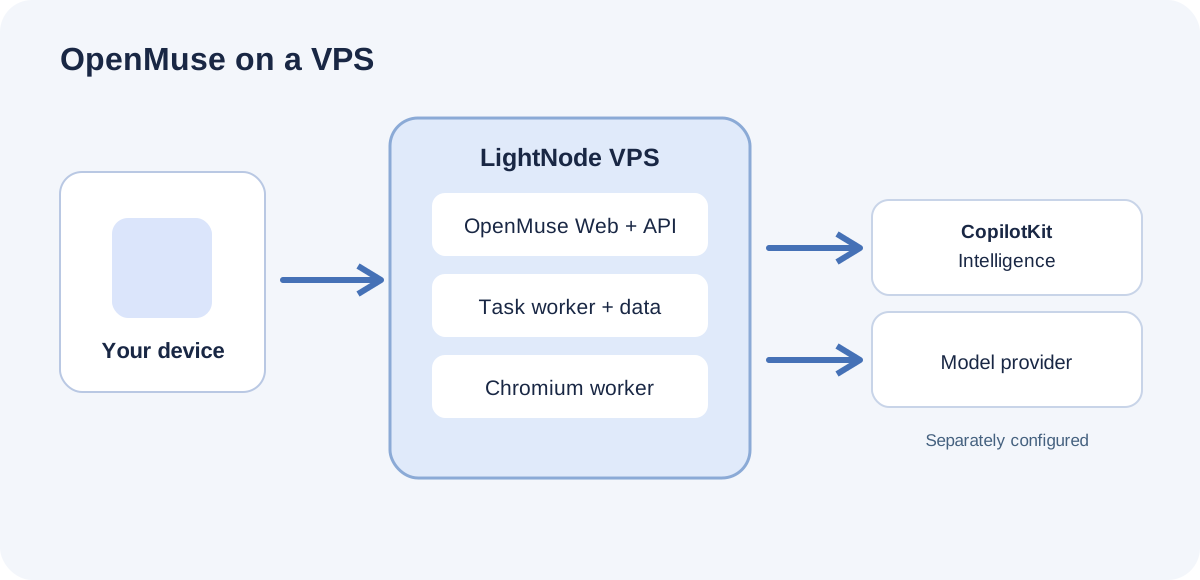
The VPS hosts the OpenMuse application and browser worker; the other services require their own configuration.
A sensible first deployment on LightNode
Begin with an Ubuntu instance on LightNode Linux VPS. The upstream quick start calls for Node.js 24 LTS, pnpm 11.19.0, and a CopilotKit Intelligence project key. Run the official example in an environment only you can access. Confirm that the web interface, API, and session start before adding a real model and browser worker. The demo uses fictional data; it is not a production setup to expose directly to customers.
The initial commands in the upstream guide are:
git clone https://github.com/CopilotKit/OpenMuse.git openmuse
cd openmuse
pnpm install --frozen-lockfile
cp .env.example .env
npx copilotkit@latest login
npx copilotkit@latest project select
After obtaining a project key, put it in the server-side .env as CPK_INTELLIGENCE_API_KEY. Follow the README to run pnpm dev and pnpm dev:web for the local example. If those commands run on your VPS, view the local port through an SSH tunnel; do not put the development server directly on the public internet. A public deployment also needs built web and API services, your own domain, and HTTPS.
For real browser tasks, configure a model provider and the Chromium browser worker with its own secret. The upstream Docker Compose file covers only the browser worker; it is not a one-command production deployment of the whole application. By default, the worker port binds to the server's local address so the co-located API can call it. Do not expose the worker port or its secret to site visitors.
For longer-term use, protect the web and API endpoints with HTTPS, restrict administrative access, back up environment settings and browser data, and test whether tasks and sessions recover after a restart. The project's security guidance recommends HTTPS and restricted networks for remote deployment. There is no single upstream VPS minimum that fits every browser workload: open tabs, concurrent tasks, and the optional Linux container all affect memory and CPU use. Size the server using your real tasks.
What “self-hosted” does and does not cover
Every OpenMuse deployment needs CPK_INTELLIGENCE_API_KEY to use CopilotKit Intelligence for conversation persistence and resumption. Real agent tasks also need a model provider or model gateway. Running the OpenMuse application and browser on your own VPS does not mean that conversation infrastructure and model inference automatically run on that VPS. The project's Rich Threads documentation describes Intelligence as a separately configured service outside OpenMuse's MIT-licensed code.
CopilotKit documents a self-hosted Intelligence option, but it requires the appropriate self-hosted or enterprise plan. Its supported path involves Kubernetes or AWS ECS and supporting systems such as a database and Redis. For one person or a small team evaluating OpenMuse on a VPS, the officially supported project-key setup is the more direct starting point. If your procurement rules require conversations and inference to remain entirely on your infrastructure, check the complete architecture, license, and model deployment before making that claim.
Who is this setup for?
A developer who wants to change an agent workflow, choose a model, and keep control of browser profiles can start with one VPS. A small team can use separate instances for separate projects so that code, browser data, and secrets remain apart. OpenMuse currently supports one owner per deployment. A shared access key is not a multi-user account system, so one instance should not be treated as a ready-made platform for unrelated customers.
If your requirement is simply to open Chrome and desktop applications remotely, Ubuntu Desktop (XFCE) VPS is a better fit. OpenMuse is for people willing to operate the application, model connection, secrets, and backups while an agent performs tasks. It also does not provide the full dedicated-VM security model Meta describes for Muse.
Frequently asked questions
Is OpenMuse a cloud desktop?
No. It lets an agent use and display a Chromium browser and can provide an optional Linux container workspace. A full graphical desktop remains on the project's roadmap. For a person who needs to sign in to an Ubuntu desktop over RDP, use a desktop VPS setup instead.
Could LightNode offer it as a one-click application image?
Its web service, API, workers, and persistent storage could be packaged into a deployment template after engineering and validation. The current upstream Compose file covers only the browser worker, and users would still need CopilotKit Intelligence credentials and model configuration. Until installation, restart, backup recovery, and resource use have been verified on a VPS, it should not be presented as an existing one-click LightNode image.
Does the VPS price include AI models and CopilotKit Intelligence?
No. VPS billing covers the compute and storage you run on LightNode. Model access and CopilotKit Intelligence have their own configuration and pricing. Allow room for browser processes, stored sessions, and backups when choosing the VPS size.
To test your own agent workflow, create an Ubuntu instance on LightNode Linux VPS, work through the OpenMuse README, and then decide whether to connect real accounts and long-running tasks. For a person-operated desktop, start with our cloud Chrome desktop guide.